
Digital Banking
Bank anywhere, literally.
Enjoy the convenience and control of Digital Banking60, giving you instant access to all your accounts around the clock. Easily manage your finances, pay bills, and more in just a few taps from your computer, tablet, or smartphone.
How to Go Paperless for Your Statements:
1. Log into Online Banking or the SCCU Mobile app.
2. Select the top left three lines and tap 'My Profile' (or click the person icon in Online Banking).
3. Then, select 'Electronic' under Statement Preferences.



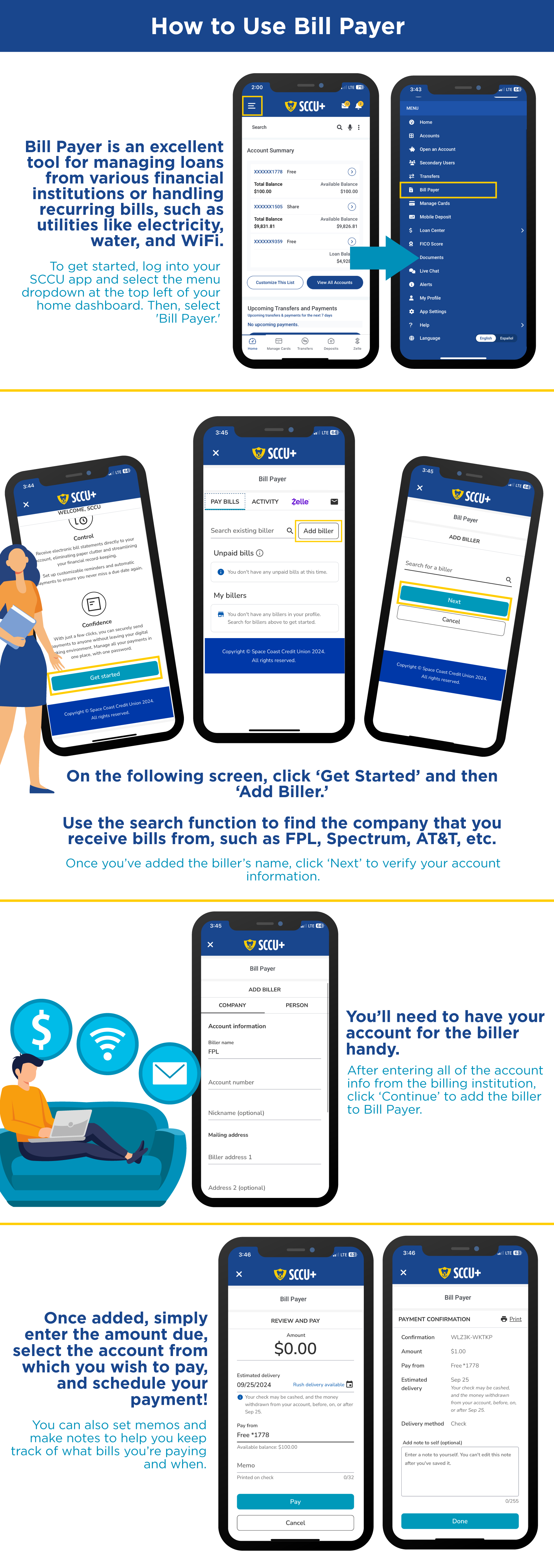
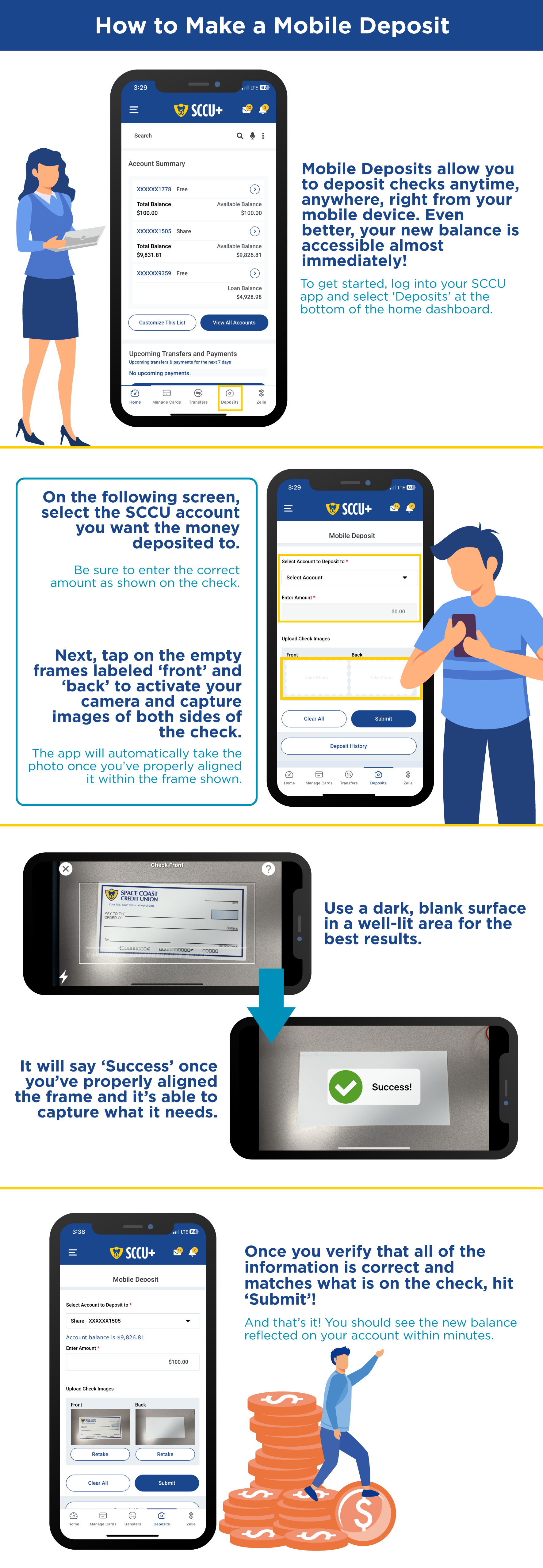
Helpful How-To Guides
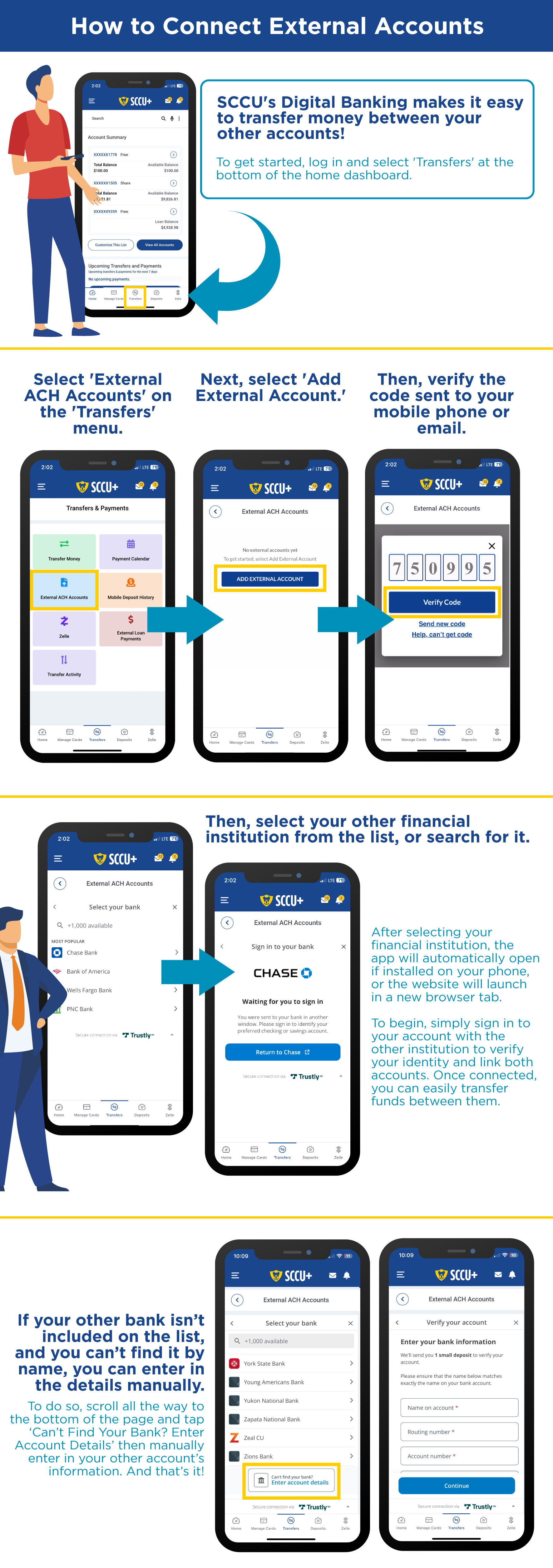
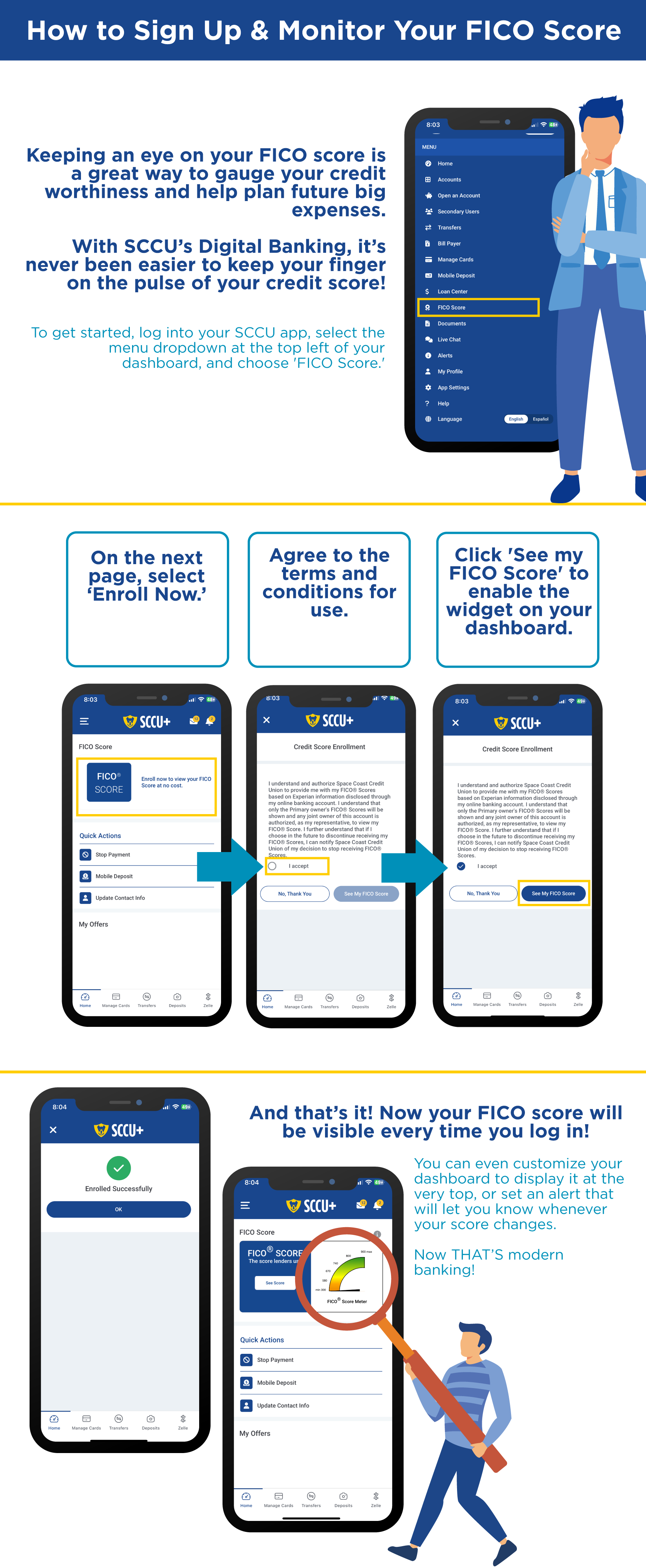
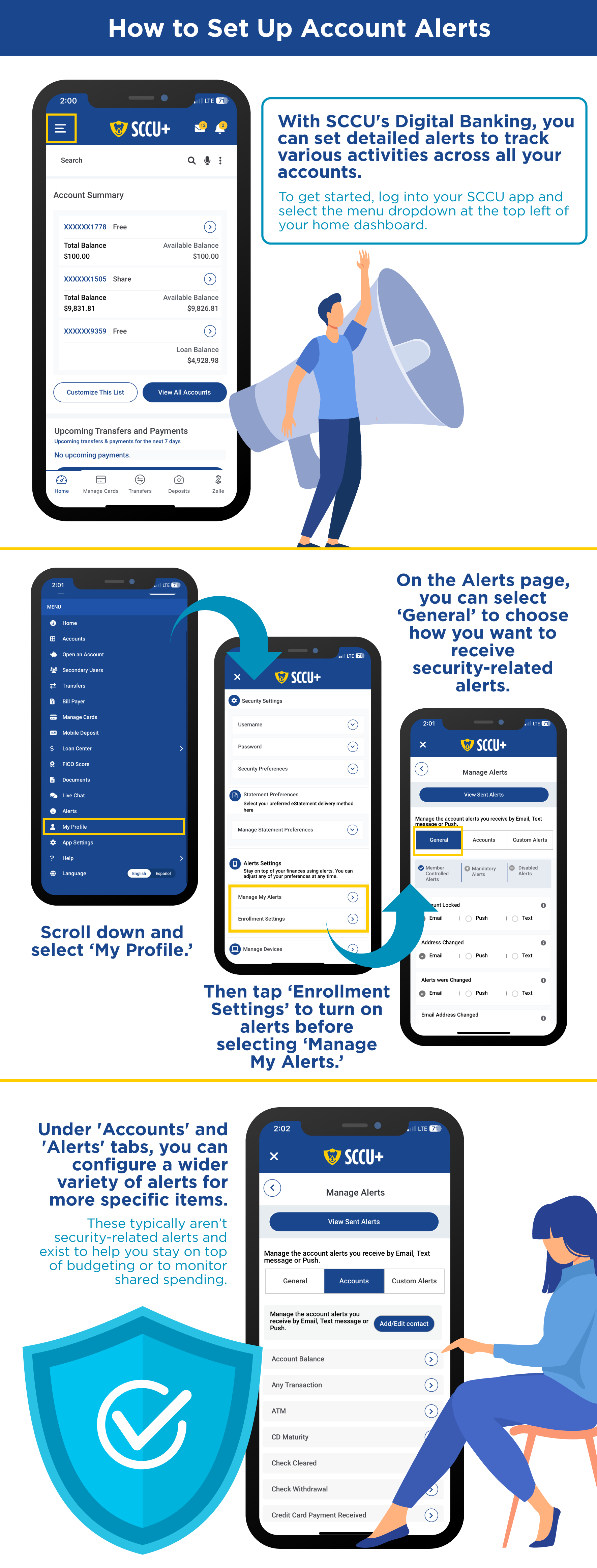
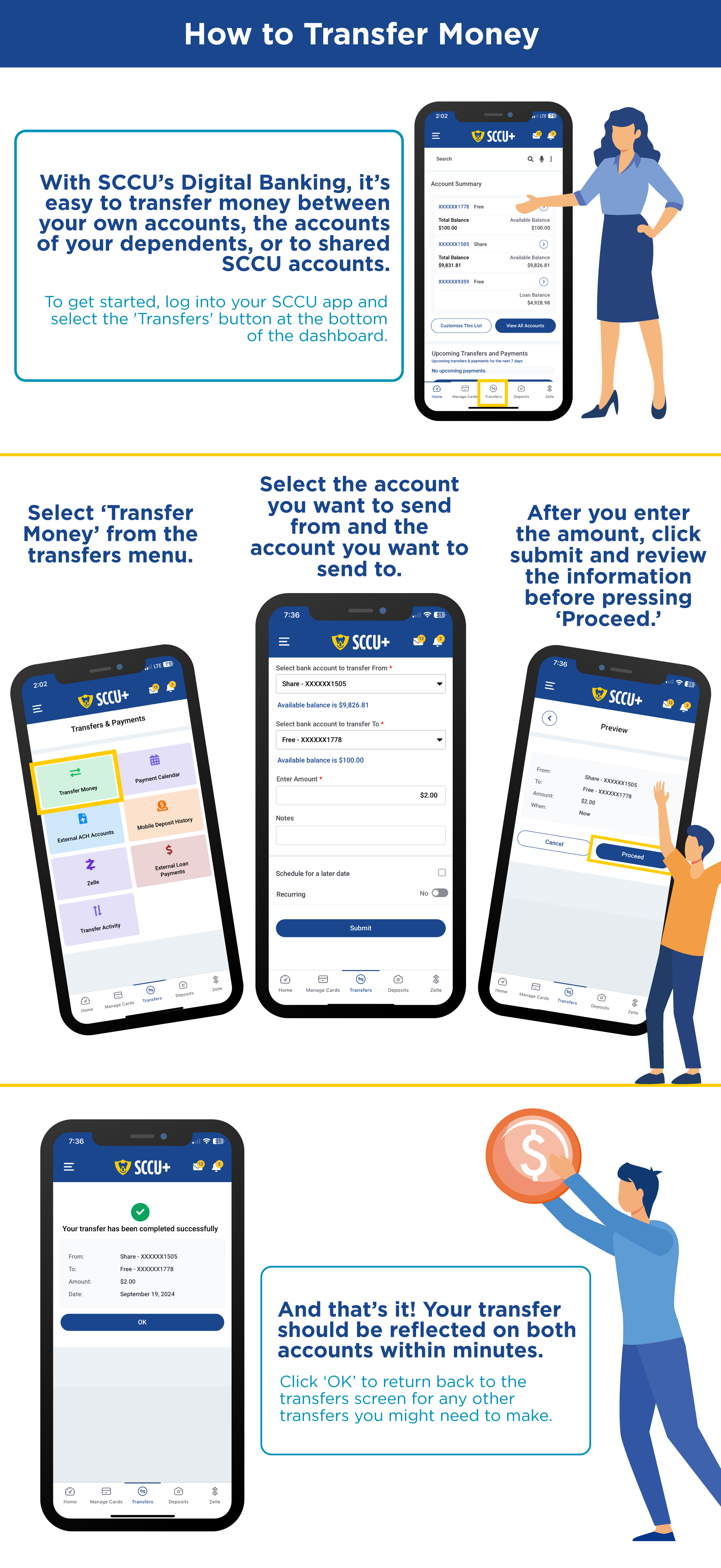

Want to Learn More?

Frequently Asked Questions
Digital banking refers to the online management of financial operations digitally. Although some banks are wholly digital, this term often refers to an option given by financial institutions: to manage their banking at one of the institution’s physical branches or to use digital options. Operations that can be handled digitally include checking balances, reviewing transactions, transferring money between accounts, paying bills, and so forth.
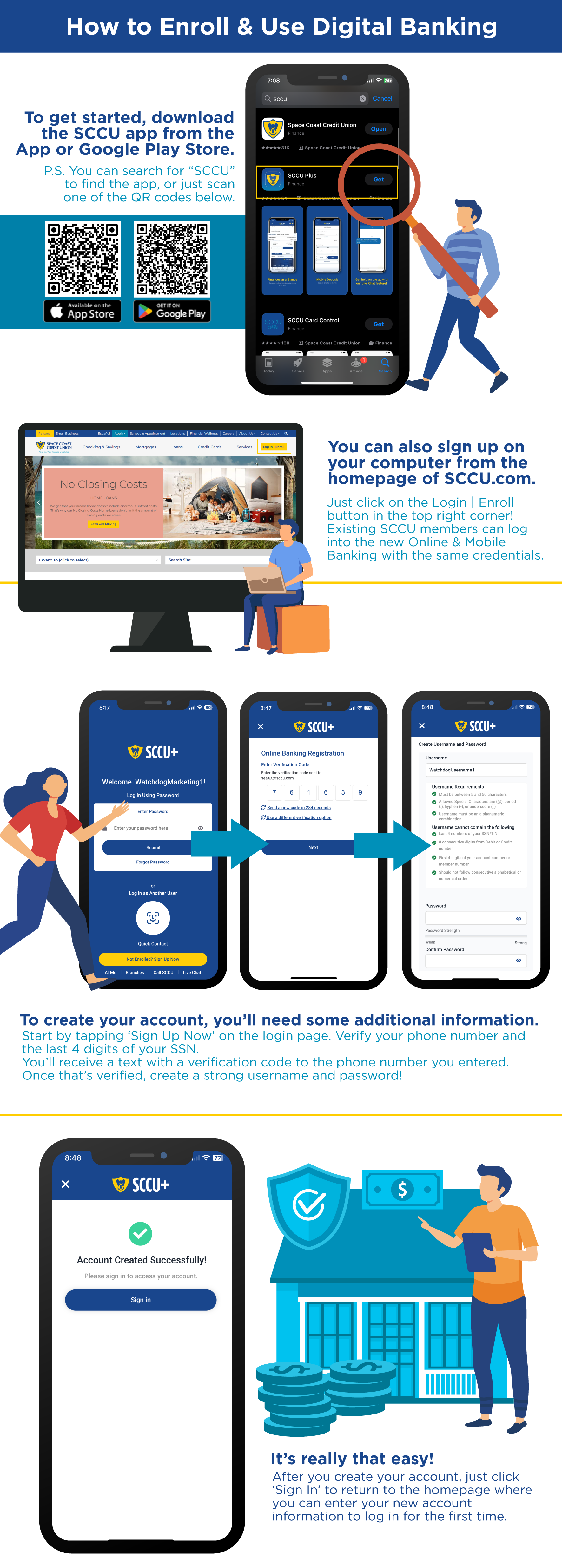
If you’d like to enroll in digital banking at SCCU, go to the sccu.com home page’s top right corner. Click on the login/enroll button. If already an SCCU member, log into your new Online & Mobile banking the same way as you normally do. If you’d prefer to use an app, go to the Google Play store and search on “SCCU” or scan the QR code on our home page. You’ll provide a bit of information, including phone number verification and the last four digits of your Social Security number. You’ll then receive a verification text before creating a strong username and password.
Although these two terms are often used interchangeably, digital banking is an umbrella term with sccu.com/services/digital-banking/online-banking being one of its components. The broader term of digital banking can include ATMs, blockchains, artificial intelligence, chatbots, and so forth. Online banking more specifically refers to conducting traditional bank activities on the internet.
That’s what’s offered at SCCU when you use the browser on your computer to access personal banking accounts and services. Another term, sccu.com/services/digital-banking/mobile-banking, refers to conducting the same sorts of financial transactions as online banking but through a mobile (smartphone) app. So, if you refer to online and mobile banking as digital banking, you’re not wrong. These aren’t the only components of digital banking; just the ones that you can use instead of going to a physical SCCU branch.
From the member’s perspective, banking digitally works much the same way as traditional banking does once you familiarize the clicks required to conduct the transactions you want. From a back end perspective, complex technologies allow behind the scenes connections to occur in secure ways for seamless, safe banking.
The two types offered at SCCU are online banking where members access and transact with their accounts through their web browser and mobile banking where a similar activity happens through a mobile app.
When a financial institution has no physical branches for people to access their services, they can be referred to as neo-banks. This isn’t the case with SCCU and our sixty-six branch locations that span the east coast of Florida, encompassing the region from Flagler to Miami-Dade counties. A mobile wallet is another type of digital banking. Examples include Apple Wallet, Google Pay, and Samsung Pay. After storing a debit or credit card (such as those offered by SCCU), people can use their devices to complete financial transactions. PayPal is a digital wallet in which you connect your PayPal account to a banking account (like an SCCU checking account) or a credit card (like an SCCU Visa) and accept money and make payments through the PayPal platform.
Perhaps the most obvious is the convenience. There’s no more driving to the financial institution or waiting in lines and, because digital banking is available 24/7, there are no worries about being outside of normal banking hours. For many people, this is an ideal accompaniment to the times when they go to a branch of their financial institution. As technology continues to advance with easy to use interfaces, digital banking is becoming even smoother and more frictionless.
Because you’re doing it all yourself, either in the comforts of home or on the go, you can take care of your banking needs quickly and confidentially. This includes applying for a bank account or loan. Gone are the days, for example, when you must schedule an appointment with a loan officer for a future date to apply for a mortgage loan. Now, once you have the proper documentation, you can do it immediately or at another time of your convenience.
Financial institutions prioritize security both in branches and with digital banking services. This can include using advanced encryption techniques to protect data and implementing secure authentications when you sign up for and use online or mobile banking services.
Plus, you can monitor and transact with your accounts whenever you’d like, sccu.com/articles/fraud-prevention/5-tips-for-safeguarding-your-personal-info in the privacy of your home. If you’ve ever felt nervous about withdrawing a large amount of cash and carrying it with you, that concern is addressed by seamlessly handling financial transactions online. And, whether you bank in a branch or digitally, accounts are covered by the same governmental protections up to $250,000 per account per depositor: by the Federal Deposit Insurance Corporation (FDIC) at traditional banks and the National Credit Union Administration (NCUA) at credit unions like SCCU.
Different dates are sometimes noted, depending upon how someone defines digital banking. For example, some people consider 1953 to be the very beginning of this financial revolution because that’s when the Stanford Research Institute built a mainframe that allowed the Bank of America to process checks. Others point to the first debit card in 1966 at Barclays in the UK or the ATM associated with this evolution that came out the following year.
Others, though, consider the 1980s as the foundation of digital banking because that’s when large banks first offered the technologies that facilitated online viewing of account balances and the paying of bills. It took at least a decade, though, for significant numbers of people to begin to trust and use digital banking services. Numbers of participants steadily grew and, when the COVID epidemic hit, people gratefully used digital banking for safe transactions.
Since then, people have continued that practice. According to statista.com/outlook/fmo/banking/digital-banks/worldwide, 1.75 billion digital banking accounts (meaning, in 2025) are processing $1.4 trillion each year, which breaks down to $2.7 million per minute. More than seventy-six percent of people in the United States use mobile banking apps with the banking habits of Millennials and those in Gen Z getting credit for the increasing adoption. People across generations, though, can appreciate the increasingly more intuitive digital banking platforms for seamless financial transactions.
As noted in the answer to the FAQ of “When was digital banking first introduced?” more than 76% of Americans already use mobile banking apps, and it’s expected that this number will continue to grow. Technologies will become more advanced and interfaces even more intuitive with more features added to digital banking as they do.
This isn’t just an American phenomenon, either. A innowise.com/blog/digital-banking-trends shows that, worldwide, 73 percent of banking transactions are digital. They cite a Research & Markets study that predicts a global banking market of $79.4 billion by 2030. They anticipate that, through a combination of artificial intelligence and the blockchain, digital banking will increase to become even more secure and more personalized.